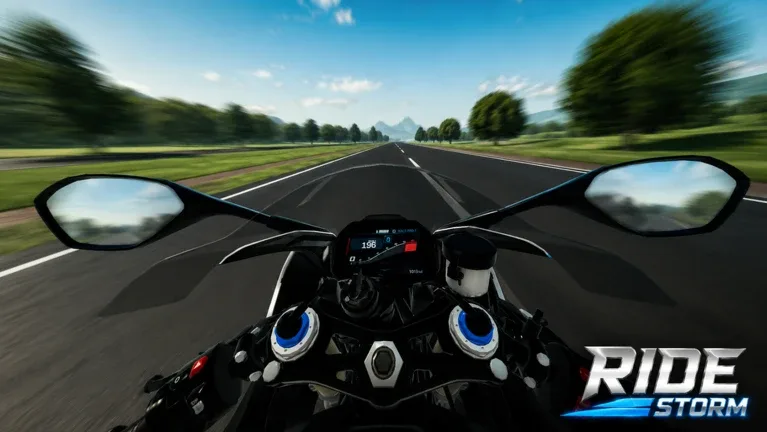
Ride Storm Guide: Mastering Motorcycle Racing and Bike Tuning on Roblox
Learn how to dominate the open world in Ride Storm on Roblox. Discover tips for efficient bike tuning, farming cash, and choosing the best motorcycles for your playstyle.
Published: Ride Storm Wiki Editorial Team
Table of Contents
Getting Started with Ride Storm
Ride Storm is an expansive open-world motorcycle racing simulator on Roblox that offers players a highly detailed experience. Whether you are a fan of realistic physics or just looking to cruise through diverse landscapes like deserts, canyons, and city streets, the game provides a robust platform for both casual riders and competitive racers.
For newcomers, the primary objective is to acquire a reliable bike that balances cost and efficiency. Based on player experiences, investing in a cost-effective, high-performance starter bike is the fastest way to accumulate the in-game currency required to unlock the rest of the game’s 90+ motorcycle catalog.
Essential Bike Tuning Strategies
Upgrading your motorcycle is the core of the progression system in Ride Storm. Tuning affects everything from acceleration to top speed, allowing you to tailor your ride to specific race types or open-world cruising.
Stock Setup: Start by testing your bike in its stock configuration to understand its base handling characteristics.
Stage 1 Tuning: Focus on basic engine and spark plug upgrades to see a noticeable increase in top speed.
Stage 2 Tuning: This tier is where you begin to see significant performance gains, often pushing bikes to reach higher speed thresholds (e.g., hitting 370 km/h on sport bikes).
Stage 3 Tuning (The Top Variant): Maximize your potential by upgrading aerodynamics and brake power alongside engine components.
According to community reports, upgrading to Stage 3 allows players to push high-end bikes like the F4V variant (inspired by the Ducati Panigale) to speeds near 386 km/h. Always remember to adjust your anti-wheelie settings and swing arm configurations based on the road conditions and your desired riding style.
Performance Comparison: Why Tuning Matters
Understanding how different stages of tuning impact your bike's performance is crucial for competitive racing.
Tuning Stage
Performance Focus
Best For
Stock
Baseline stability
Learning bike physics
Stage 1
Moderate speed boost
Early farming/City cruising
Stage 2
High-speed consistency
Highway racing
Stage 3
Maximum velocity & handling
Competitive racing events
While Stage 3 offers the highest top speed, it requires more skill to manage the increased power. If you find your bike is too twitchy, try reverting to Stage 2 or adjusting your brake power settings to find a more comfortable balance.
Tips for Efficient Money Farming
Farming cash efficiently is the key to unlocking the rarest bikes in the game. Here is how you can maximize your time spent on the map:
Tip
Focus on Efficiency: Don't waste early-game cash on purely cosmetic upgrades. Prioritize engine and aerodynamics upgrades that directly impact your race times.
Highway Runs: Utilize the long stretches of highway for high-speed testing to earn rewards quickly.
Stay Updated: Keep an eye out for game updates. Developers frequently add new content, such as exhaust updates or special events, which can provide unique opportunities to earn bonus rewards.
Exploring the Open World
Ride Storm isn't just about racing; it is about the freedom of the ride. The map is divided into varied biomes, each offering a different riding experience.
City Streets: Perfect for practicing tight turns and navigating traffic.
Highways: The best place to test the absolute top speed of your Stage 3 tuned bikes.
Mountains and Canyons: Require better handling and braking, making them ideal for testing the agility of your motorcycle.
Always keep your bike in peak condition by visiting the customization shop regularly. As you unlock more bikes, keep a diverse garage so you can switch between a nimble bike for city streets and a high-power machine for open-road challenges.
FAQ
How many motorcycles are available in Ride Storm?
You can unlock and ride over 90 different motorcycles in the game, ranging from standard street bikes to high-performance racing machines.
Is there an anti-wheelie setting?
Yes, the game features an anti-wheelie setting in the customization menu. You can enable or disable this depending on whether you want to perform wheelies or prioritize stable acceleration during races.
Where can I find new updates for the game?
Follow the official Ride Storm Roblox page to stay updated on new bike releases, event notifications, and gameplay patches.