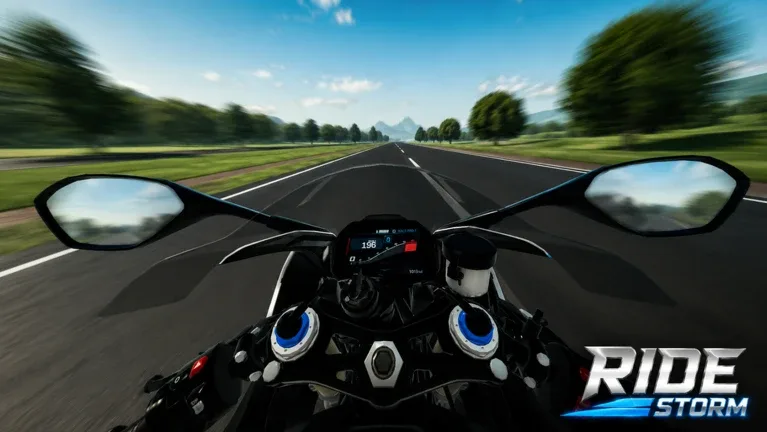
Ride Storm Guide: How to Master Wheelies, Controls, and Camera Views
Master Ride Storm on Roblox with our expert guide. Learn how to perform perfect wheelies, adjust camera views for first-person riding, and optimize your bike's performance.
Published: Ride Storm Wiki Editorial Team
Table of Contents
Mastering Motorcycle Handling in Ride Storm
Ride Storm has quickly become a standout title for motorcycle enthusiasts on the Roblox platform. With its commitment to realistic-inspired handling, smooth physics, and an expansive open-world map, it offers more than just simple racing; it provides a comprehensive biking experience. Whether you are navigating winding canyon roads, cruising through city streets, or tearing up the highway, mastering your bike’s controls is the key to enjoying the game to its fullest.
Many players come to the game looking to perform stunts, specifically the iconic wheelie. While the game’s physics engine is designed to be accessible, it requires specific input combinations to execute tricks successfully. Furthermore, because the game offers over 90 different motorcycles, understanding how each bike reacts to your inputs is essential. In this guide, we will break down the mechanics of the game, how to optimize your view, and how to perform stunts effectively.
How to Perform the Perfect Wheelie
Performing a wheelie is a staple skill for any virtual biker. According to community reports and player guides, the process is straightforward but requires precise gear management. If you are struggling to get your front wheel off the ground, follow these steps to ensure your bike is configured correctly.
Select Your Bike: Choose a motorcycle from your collection. Remember that physics can vary, so if one bike feels "stuck" to the ground, try a different model.
Disable the Parking Brake: Ensure you are not in park. Press the Shift key to toggle the parking brake off.
Switch to Manual Mode: Press the 'M' key on your keyboard. This switches your transmission mode from automatic to manual.
Set the Gear: Use your gear keys to shift down to Gear 1 or Gear 2. These lower gears provide the necessary torque to lift the front wheel.
Execute the Wheelie: While in the lower gear, hold down the 'W' key (accelerate). The bike should lift its front wheel.
Tip
Why Gear Selection Matters: In Ride Storm, using the correct gear is crucial for stunts. Higher gears are designed for top speed and highway cruising, whereas lower gears (1 and 2) provide the immediate power delivery required to initiate a wheelie. If you find your bike isn't lifting, you are likely in a gear that is too high.
Optimizing Your Camera for a First-Person Experience
A common request among players is how to play in "first-person" mode. While the game is fundamentally built as an open-world racing simulator that defaults to a third-person view, you can easily manipulate the Roblox camera system to create an immersive first-person perspective.
To get the most "first-person" experience in Ride Storm:
Manual Zoom: Use the scroll wheel on your mouse to zoom your camera all the way in. This will place the camera directly over the handlebars or behind the rider's helmet, providing a more focused view of the road ahead.
Shift Lock: Many players prefer enabling "Shift Lock" in the Roblox settings menu. When enabled, your camera stays fixed behind the bike, which can help with steering precision and maintaining a consistent line through corners.
Why It Matters: Riding in a closer perspective increases the sense of speed and immersion. When you are navigating the detailed environments—from deserts to scenic mountain roads—a tighter camera angle helps you better judge the apex of turns and avoid obstacles that might be harder to see from a wide, zoomed-out camera angle.
Understanding Bike Modes and Customization
Ride Storm isn't just about riding; it's about the machine you choose to ride. With over 90 motorcycles available, understanding the difference between your options is vital.
The Importance of Manual vs. Automatic
As noted in our wheelie guide, the 'M' key is your best friend. In many driving simulators on Roblox, automatic transmission is fine for casual cruising. However, for players who want to master the physics engine, manual mode is non-negotiable. It allows you to hold the engine in the power band, which is necessary for stunts and climbing steep inclines in the game's various biomes.
Customization and Upgrades
The game provides deep customization options. As you race and complete challenges, you should focus on:
Engine Upgrades: These directly impact your acceleration and top speed.
Handling Tweaks: If you find a bike too difficult to control at high speeds, look for upgrades that improve "handling" or "physics."
Visuals: While cosmetic, customizing your bike helps you stand out in the open-world map when riding with friends.
Choosing the Right Bike
Not all bikes are created equal in Ride Storm. When selecting a bike, check the stats. Some bikes are built for high-speed highway racing, while others are better suited for the agility needed on city streets or winding mountain roads. Always test your bike's limits in a safe area before heading into a competitive race.
Exploring the Open World
Ride Storm features a massive, diverse map designed for exploration. The developers have included highways, city streets, canyons, and mountains. Each of these zones offers different challenges:
Highways: Best for testing the top speed of your upgraded bikes.
City Streets: Great for practice, maneuvering through traffic, and social interaction.
Canyons and Mountains: These areas offer the most technical riding. The curves and elevation changes will test your ability to brake, lean, and accelerate out of corners.
Don't just stick to one area. The game’s dynamic weather and special events often encourage players to explore different parts of the map. Participating in these events is often the fastest way to earn rewards and unlock new, faster motorcycles.
FAQ
Why can't I perform a wheelie on my bike?
Not every motorcycle in the game is tuned for wheelies. If you have followed the steps (Shift to disable brake, 'M' for manual, Gear 1/2, hold 'W') and it still doesn't work, try switching to a different bike model. Some bikes have different physics profiles.
How do I get more bikes in Ride Storm?
You can unlock bikes by participating in races, completing challenges, and using in-game currency earned through gameplay. Keep an eye on the game's official store and event updates for new additions.
Is there a dedicated first-person camera button?
No, Ride Storm does not have a single-button toggle for first-person view. You must manually scroll your mouse wheel in to zoom the camera until it reaches the first-person perspective.
Does the parking brake affect driving performance?
Yes. If you accidentally leave your parking brake on (using the Shift key), your bike will have significantly reduced acceleration and may feel sluggish or unresponsive. Always double-check your brake status if your bike feels slower than usual.