Ride Storm Helmets: How to Unlock and Customize Rider Gear
Learn how to unlock, equip, and customize Ride Storm helmets on Roblox. Explore rider gear codes, avatar integration, and custom bike aesthetics.
Published: Ride Storm Wiki Editorial Team
Table of Contents
Rider Customization and Helmets in Ride Storm
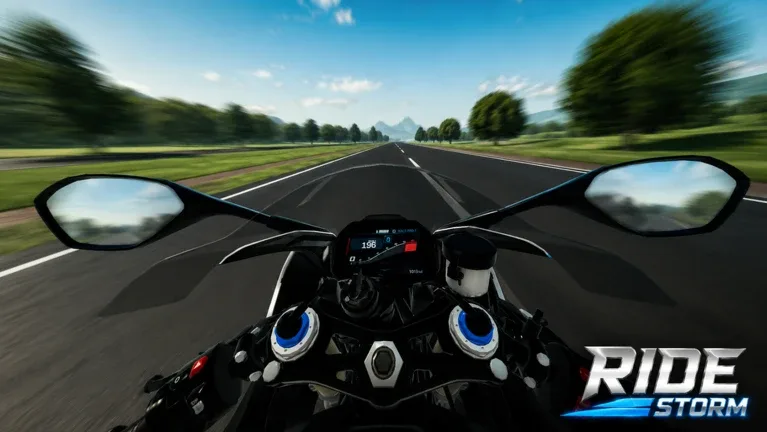
In Ride Storm, looking the part is just as important as mastering high-speed canyon turns. While the open-world racer features more than 90 detailed motorcycles ranging from aggressive superbikes to highway cruisers, your rider's visual presentation completes the experience. Equipping stylish Ride Storm helmets allows players to create realistic track-day setups, match custom bike liveries, and stand out in multiplayer meets across the map.
Unlike arcade titles that lock your character into rigid presets, Ride Storm integrates your Roblox avatar alongside specialized in-game customization systems. This hybrid approach gives you substantial control over visors, racing suits, and protective headgear. Whether you are aiming for a high-visibility MotoGP replica or a stealthy tinted streetfighter look, understanding how headwear functions in the game's physics environment is essential for every enthusiast.
Community interest in rider gear surged alongside recent game updates and code releases. New players frequently ask whether helmets provide performance advantages or if they exist solely as cosmetic vanity items. In this guide, we break down how headgear works, how to properly equip and align helmets without clipping, and how to maximize your aesthetic options using avatar items, promo codes, and in-game passes.
How Helmets Work in Ride Storm
Before spending currency on gear, players need to understand the mechanics governing rider equipment in Ride Storm. The game focuses on physics-driven riding and detailed vehicle tuning, treating rider cosmetics primarily as visual layers attached to your avatar rig.
Pure Cosmetics vs. Performance Stats
Helmets in Ride Storm do not alter your motorcycle's top speed, lean angle, acceleration, or crash recovery times. Your bike's engine upgrades, tuning profiles, and chassis selections dictate mechanical performance. Helmets serve three core purposes:
Aesthetic Immersion: Full-face racing helmets complete the authentic sportbike silhouette, especially in first-person camera mode.
Visual Identity: Coordinated colors help your crew spot you during massive group rides across highway stretches.
Photo Mode Appeal: Sharp rider gear elevates screenshots taken during scenic sunset cruises in mountain and canyon sectors.
Because headgear does not grant mechanical advantages, you are free to wear any style you like without worrying about sacrificing competitive lap times during community races.
Avatar UGC Integration vs. In-Engine Props
Ride Storm reads head accessories equipped directly through your Roblox avatar profile. When you mount any of the 90+ motorcycles, the engine anchors your avatar—and all equipped accessories—to the vehicle's handle and seat nodes.
If you own motorcycle helmets from the Roblox Avatar Shop (UGC catalog), the game renders them over your character model. In addition, developer updates and community events regularly introduce themed cosmetics, visual expansions, and redeemable gear codes designed to complement specific motorcycle releases.
How to Equip and Adjust Helmets
Equipping headgear for your rides requires selecting the right items on the platform and ensuring your avatar proportions fit comfortably on sports and cruiser frames. Follow these steps to prepare your rider setup:
Choose Your Helmet in the Avatar Editor: Open the Roblox Avatar Customizer on your PC or mobile app. Navigate to the Accessories tab and select the "Head" or "Face" category.
Remove Conflicting Hair and Hats: Unequip bulky hair models, wide-brimmed hats, or oversized horns that could clip through the shell or visor of your motorcycle helmet.
Equip Low-Profile Balaclavas or Caps (Optional): If your avatar shows bare skin gaps beneath the helmet collar, equip a neutral black balaclava or ski mask accessory.
Check Body Scaling: Set your avatar proportions to standard R15 scaling. Extreme height or width sliders can distort your rider's posture when leaning into corners.
Launch Ride Storm: Join a server on the official Ride Storm Roblox page, spawn your motorcycle at a garage or spawn pad, and mount the vehicle to verify your helmet positioning.
If you notice minor visual clipping when leaning forward at high speeds, tweaking your avatar head size by a few percentage points in the Roblox settings usually resolves the issue.
Popular Helmet Styles and Matching Bike Builds
A well-styled helmet elevates your entire build. Community members often coordinate their helmet types with specific motorcycle classes to build authentic themes.
Superbike Full-Face Helmet
Best Paired With: Track bikes, liter bikes, RSBK racing models
Visual Profile: Aerodynamic rear spoiler, tinted or mirrored visor, bright racing decals
Style Tip: Pair a multi-color graphic helmet with neon bike wheel accents and matching leather race suits to mimic professional circuit racers.
Dual-Sport & Enduro Helmet
Best Paired With: Adventure tourers, dirt bikes, canyon scramblers
Visual Profile: Extended sun peak visor, open goggle port, rugged chin bar
Style Tip: Combine this style with matte-finish off-road bikes to tackle mountain paths, dirt trails, and desert terrain.
Retro Modular & Open-Face Helmet
Best Paired With: Cruisers, classic cafe racers, bobbers
Style Tip: Best worn with classic leather jackets and casual jeans for relaxed highway cruising and urban exploration.
Streetfighter / Urban Dark Helmet
Best Paired With: Naked bikes, hyper-nakeds, tuned street motorcycles
Visual Profile: Angular jawline, pitch-black iridium visor, matte black or carbon finish
Style Tip: Match with all-black bike frames and customized underglow for nighttime street rides.
Redeeming Codes for Cash and Gear Updates
The developers of Ride Storm periodically release promotional codes during seasonal events, milestone celebrations, and balance updates. Community channels and player reports frequently highlight codes released alongside gear updates, allowing riders to claim instant in-game cash or limited-time bonuses.
While specific promotional codes change frequently, using the redemption feature is straightforward:
Launch Ride Storm and load into the game world.
Look for the Codes or Gift icon located on your main screen interface (usually on the side or bottom menu).
Type or paste your active code exactly as shown, preserving capitalization.
Click the Redeem button to claim your rewards, which typically deposit cash directly into your wallet.
Visit the vehicle dealer or modification stations to spend your bonus cash on new motorcycles and tuning parts.
Tip
Always copy and paste codes directly from verified community announcements or social channels. Codes are case-sensitive and expire once promotional windows close.
To make sure your redemption goes smoothly, run through this quick checklist:
[ ] Copied code without trailing spaces or typos.
[ ] Checked that the server is updated to the latest build.
[ ] Confirmed you have not already claimed the code on your account.
[ ] Checked the current event banner to ensure the promotion is active.
In-Game Customization Pass and Expansion Perks
Ride Storm offers several optional gamepasses that enhance how players interact with their vehicles and surroundings. For players focused heavily on aesthetics, the game catalog features a dedicated Customization Expansion pass (priced at 49 Robux during early testing stages).
What the Customization Pass Offers
The Customization Expansion is designed to expand standard tuning options, giving players deeper control over vehicle styling:
Enhanced Color Palettes: Access specialized paints, pearl finishes, and matte coatings that can match your helmet's graphics.
Detail Tuning: Customize finer mechanical components on select bikes, letting your rider look cohesive from visor to rim.
Future Cosmetic Integrations: As developer updates expand, gamepass owners frequently receive early access to visual feature rollouts.
Other popular passes—such as VIP (700 Robux), 2X Cash (250 Robux), and specialized vehicle packs like Police Bikes or Tuned Bikes—accelerate how quickly you can fill your garage, giving you more platforms to pair with your gear collection.
Fixing Visual Clipping and Camera Glitches
Because Ride Storm features realistic rider physics where your character leans dynamically into sharp corners, helmet accessories can occasionally exhibit visual glitches. Here are community-tested solutions for common gear issues:
Visor Clipping Through Hair
If your avatar's hair pokes through the glass visor or solid shell of a full-face helmet, the accessory layer priority is conflicting.
Tip
Switch to a "hair base" accessory or a bald avatar preset when wearing full-face racing helmets. If you prefer keeping your hair style, seek out UGC helmets specifically labeled as "hair-compatible" or "oversized shell."
First-Person View Blocking
Driving in first-person mode provides an intense sense of speed, but bulky helmets can sometimes block the camera view.
Warning
Certain wide-visor helmets with internal meshes can obstruct your screen in first-person perspective. If this occurs, switch your camera perspective to third-person, or choose a low-profile helmet accessory that respects standard camera offsets.
Animation Lag on High-Ping Connections
When playing on servers with higher latency, accessories may briefly appear to detach from your rider's head during high-speed crashes or sudden dismounts. This is purely a client-side visual desynchronization. Once your character stands back up and remounts, the helmet will automatically snap back into its proper attachment node.
Best Practices for Group Rides and Meets
Helmets play a central role in organizing themed group rides. Ride Storm servers support up to 20 players, making private and public cruise meets a staple of the community. Here is how to coordinate your rider style for server events:
Team Colors: Coordinate helmet base colors with your crew. For example, assign yellow shells to track leaders and dark visors to rear sweepers during highway runs.
Livery Harmony: Avoid clashing patterns. If your bike has complex, multi-colored decals, choose a solid-color helmet (matte black, gloss white, or raw carbon) to keep your silhouette clean.
Night Visibility: For night cruising through mountain switchbacks, pick helmets with neon accents or high-contrast visors that pop under streetlights and headlights.
Frequently Asked Questions
Do helmets reduce crash damage in Ride Storm?
No. Ride Storm does not feature an armor or health penalty system tied to riding gear. Crashes reset your motorcycle position, and wearing a helmet does not alter crash physics, respawn timers, or bike durability.
Can I recolor my helmet inside the Ride Storm garage?
Currently, accessories equipped through your Roblox avatar retain the textures and colors set in the Roblox catalog. To change your helmet's color, you must equip an alternate colorway from your Roblox inventory. Bike paint modifications are handled separately inside the garage.
Where can I find new codes for Ride Storm?
Check the developer's official game description on Roblox, event update logs, and verified community announcement boards. Codes are released periodically during milestones, holiday events, and major balance patches.
Why does my helmet look misaligned when leaning?
Misalignment is usually caused by non-standard avatar scaling. If your avatar uses custom R15 scale proportions (such as extreme torso height or oversized head scaling), the game's riding animation can stretch the attachment point. Reverting to 100% standard scaling resolves most alignment issues.